
How do I cancel a shipment?
Open the shipment's tracking page, click Edit, and submit a cancellation request. Self-cancel works only before a driver is assigned; after that, contact Support (a cancellation fee may apply). Steps below.
If you need to cancel your Mothership Carrier Network local shipment after you've booked, you're able to do so yourself directly from your dashboard as long as a driver hasn't been assigned.
If the shipment hasn't been assigned to a driver yet, you are able to cancel without a fee. You can see whether a driver has been assigned under Activity in the bottom left corner of the map on the tracking page. Once a driver has been assigned, you'll see a "Driver assigned" update.
You can also cancel National LTL Partner Carrier shipments in the Dashboard as long as you cancel before the shipment's freight ready time. If you need to cancel after the freight ready time, please contact Support immediately. Fees may apply.
The process:
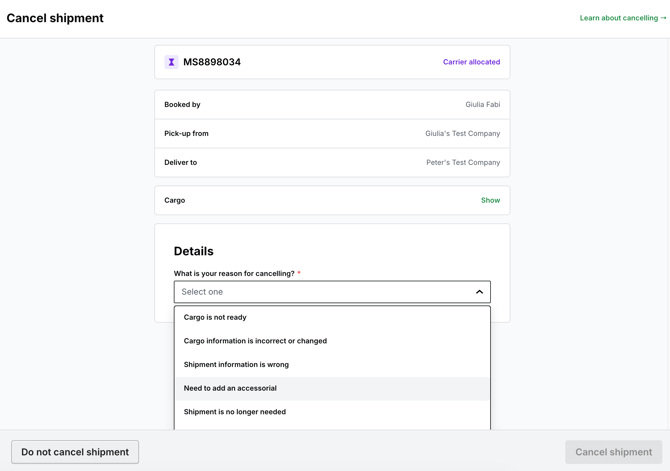
Just head to your tracking page, and select the shipment you'd like to cancel. From the shipment detail page, click the cancel button in the top right corner, and you'll be able to submit a cancellation request (screenshot below).

Then from there set your cancellation reason and continue:
If you are unable to cancel your shipment, contact the Mothership support team via the “Chat with support” button in the Dashboard to request cancellation; fees may apply.
If a driver has been assigned or a pickup attempt has been made, specific charges may apply depending on the carrier and scenario. For example, some carriers like Central Transport may not charge for missed pickup attempts, but other cases might involve fees tied to the pickup process.
-
$49 minimum fee to cancel Mothership Carrier Network local shipments
-
National LTL Partner Carrier shipments vary by carrier. Additionally, missed or dry run pickups may not always incur extra charges for cancellations.