
How do I add teammates (including for 3PL accounts)?
Managers can invite users by selecting their Account Name in the bottom-left corner and choosing Add a user, or by navigating to Settings —> People. There are four roles — Manager, Accountant, Shipper, and Viewer — each with different permissions. Steps below.
We know freight shipping is a team effort. We made it easy for you to invite your teammates with different notification settings for enhanced productivity.
To quickly invite a new team member, select your Account Name in the bottom-left corner of your dashboard and click Add a user.
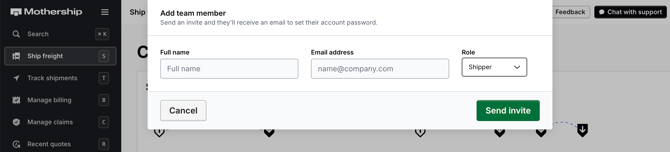
To view your entire team roster or manage existing team members, select your Account Name —> Settings —> People.
Note that only managers are able to invite new team members.
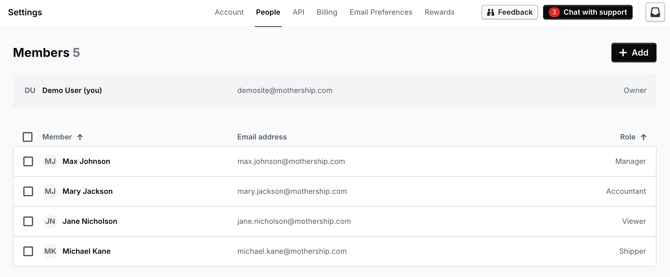
Team Member Types
Invite team members at varied access levels to make freight shipping even easier. When you invite someone to your team, you can set the types of notifications they receive.
Manager or Supervisor
Receive all notifications related to shipping and billing. Able to quote, book, ship, manage payments, and invite team members.
Accountant
Receive billing notifications only. Able to manage payment settings.
Shipper
Receive shipping notifications only. Able to quote and book shipments.
Viewer
Able to view shipments and tracking but unable to quote or book shipments.
Click this link to go to your dashboard and add teammates.