
Release Date: 2026-10-09
What changed
You can now download rebills as a CSV from Manage billing → Rebills in your Mothership dashboard. It works the same way as exporting invoices, so you can review and reconcile post-shipment charges faster.
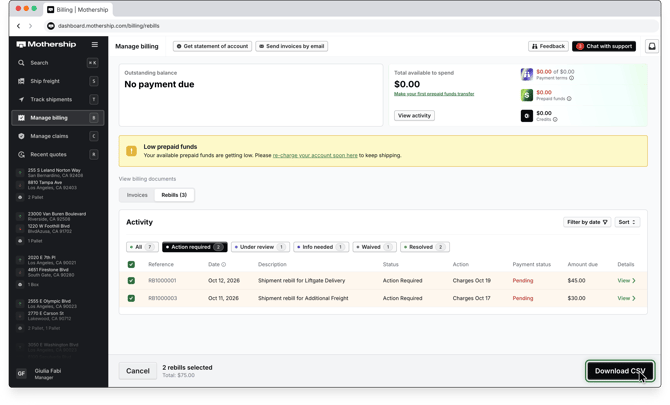
The new export includes:
- Select one rebill, several, or export your current filtered view
- One row per charge line item, so every charge on a rebill is broken out
- Key billing details, including status, respond-by date, charge amount, carrier processing fee, charge total, amount due, and dispute notes when present.
- Values reflect each rebill as of the moment you export
Why this matters
Teams handling rebills across many shipments often need to review charges offline or pass them to finance. Previously, that meant copying rows by hand. A CSV export makes it easier to see what needs a response, check amounts, and reconcile rebills against your own records.
How it works
- Go to Manage billing and select Rebills under View billing documents.
- Select the rebills you want, or use the status filters (such as Action required) and Filter by date to narrow the list and export your current view.
- Download the CSV.
Rebills are available as CSV only. There is no PDF version of a rebill.
What to do next
No action is required. The CSV export is available in your dashboard now.
For step-by-step instructions and answers to common questions, see How to download rebills as a CSV.